
You built your website. You published your pages. You waited and then nothing. If you are asking why is my website not getting traffic, you are not alone. This is one of the most common problems businesses and creators face in 2026. After auditing over 500 struggling websites, the most common causes are almost always the same: indexing problems, wrong keywords, slow speed, thin content, zero backlinks, and technical barriers. The good news is that every one of these problems is fixable.
This complete guide answers why is my website not getting traffic with a specific diagnosis and fix for each major cause. Every fact is backed by verified data from industry research listed at the end of each section.
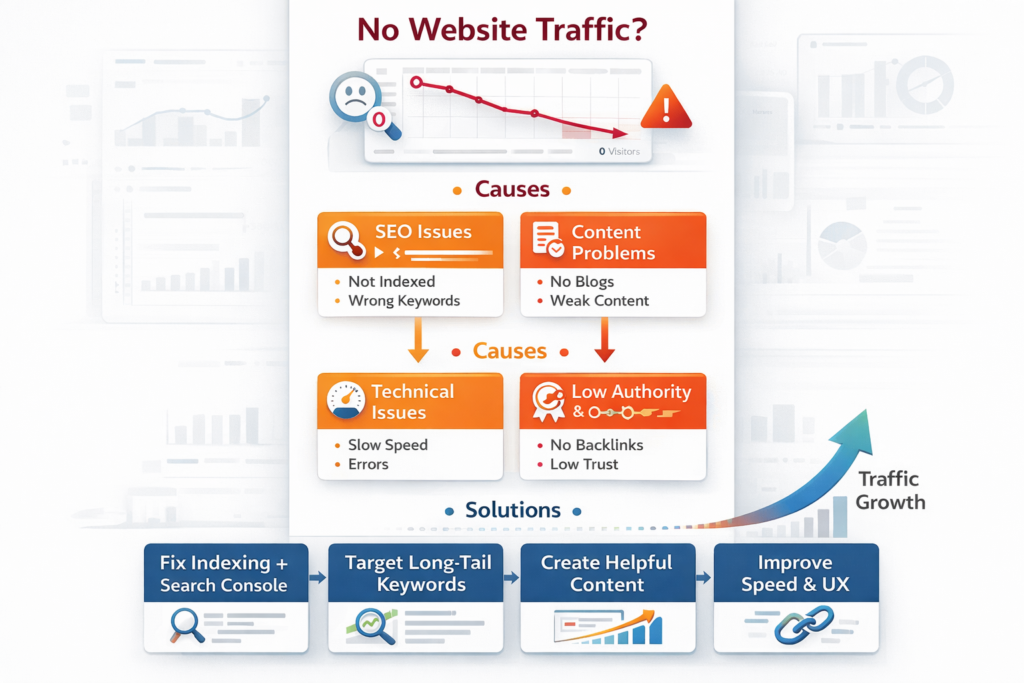
Run This 5-Step Diagnosis First
Before diving into individual causes, run these five quick checks to pinpoint your biggest problem immediately:
| Check | How to Do It and What It Means |
|---|---|
| Indexing check | Type site:yourwebsite.com into Google. If nothing shows, your site is not indexed and cannot receive any organic traffic. |
| Speed check | Run Google PageSpeed Insights. A score below 50 on mobile is a significant ranking barrier in 2026. |
| Search impressions check | Open Google Search Console and check Total Impressions. Zero impressions means Google is not showing your pages for any keyword. |
| Backlink check | Use Ahrefs, Semrush, or Moz free tools. Zero referring domains means Google has no external trust signals for your site. |
| Keyword volume check | Check if the keywords you target have actual monthly search volume. Many sites rank for keywords that nobody searches for. |
Key Takeaway
Whichever check fails first is your most urgent problem. Fix them in the order they appear above. There is no point building backlinks or improving content if your site is not even indexed.
10 Reasons Why Your Website Is Not Getting Traffic in 2026
Here are the ten most common answers to why is my website not getting traffic, each with a specific, actionable fix:
1. Your Website Is Not Indexed by Google
This is the first thing to check and the most fundamental problem. If Google has not indexed your pages, they cannot appear in search results under any circumstances. New websites can take weeks to be crawled and indexed. A misconfigured robots.txt file or a no index tag accidentally applied to pages are two common technical causes of zero indexing.
Fix
Search Google for site:yourwebsite.com. If your pages do not appear, submit your sitemap in Google Search Console under Indexing and request indexing for your key pages. Check that your robots.txt file is not blocking Googlebot. Verify no noindex tags are active on important pages.
2. Your Website Is Too New
New websites typically take 3 to 6 months to start receiving meaningful organic traffic. Google needs to crawl your pages, evaluate your content, assess your authority, and build enough confidence in your site before ranking it. This is called the Google sandbox effect. Publishing a new website and expecting traffic within days or weeks is unrealistic regardless of content quality.
Fix
Publish content consistently. Build initial backlinks from local directories, business listings, and industry-relevant websites. Submit your sitemap to Google Search Console. Be patient. SEO for new websites is a 3 to 6 month process, not a 3 to 6 week one.
3. You Are Targeting the Wrong Keywords
90% of all web pages receive zero organic traffic from Google. The most common reason is targeting keywords that no one searches for, or going after extremely competitive keywords where you cannot realistically rank. According to research from Total Web Company, in 500+ site audits, targeting zero-volume or impossibly competitive keywords was one of the top three causes of zero traffic websites in 2026.
Fix
Use Google Keyword Planner, Ubersuggest, or Semrush to verify actual monthly search volume for every keyword you target. Start with long-tail keywords of 3 to 5 words with modest search volumes and low competition. A first-page ranking for a 500-search-per-month keyword is worth far more than a page-5 ranking for a 50,000-search-per-month keyword.
4. Your Content Does Not Match Search Intent
Even if you rank for a keyword, ranking with the wrong type of content for that keyword’s intent causes high bounce rates, which Google uses as a signal to reduce your ranking. Sending users to a landing page when they expected a guide, or publishing a blog when users wanted a comparison tool, are classic intent mismatches. In 2026, Google’s AI models are increasingly sophisticated at detecting and penalising intent mismatch.
Fix
Search for your target keyword on Google and study the format of the top 5 results. If they are all how-to guides, your page needs to be a guide. If they are all comparison tables, build a comparison page. Match the content format to what Google is already rewarding for that specific query.
5. Your Website Loads Too Slowly
A 1-second delay in page load time increases bounce rate by 32%. Google uses page speed as a ranking factor, and in 2026 this has become more consequential as AI Overviews and rich results take up more of the SERP. Sites loading in under 2 seconds on mobile consistently outperform slower sites in local rankings. A slow website does not just frustrate visitors. It directly prevents your pages from ranking well.
Fix
Run Google PageSpeed Insights on your key pages. Target a score above 70 on mobile. Common fixes include compressing large images, removing unused plugins and scripts, enabling browser caching, switching to faster hosting, and using a CDN. Every second of improvement in mobile load time measurably improves your ranking signals.
6. Your Website Is Not Mobile-Friendly
Google uses mobile-first indexing, which means it evaluates and ranks the mobile version of your website, not the desktop version. In 2026, over 60% of all web searches happen on mobile devices. A website that displays poorly on smartphones, has tiny buttons, unreadable text, or a broken layout on mobile will rank lower than a mobile-optimised equivalent regardless of content quality.
Fix
Use Google’s Mobile-Friendly Test tool and Google Search Console’s Mobile Usability report to identify specific mobile issues. Switch to a responsive design that adapts automatically to screen sizes. Ensure text is readable without zooming, buttons are large enough to tap, and your page loads in under 3 seconds on 4G mobile.
7. Your Content Is Thin or Not Valuable
Google’s core updates consistently target thin, low-value, and AI-generated content that provides no genuine expertise or original insight. In 2026, AI Overviews appear on 15.69% of queries (Semrush data) and they reward content that is clearly structured, cites trustworthy sources, and demonstrates first-hand experience. Generic, recycled content ranks lower than it ever has. Content that does not answer a real question with genuine depth simply does not receive organic traffic.
Fix
Audit every page on your website. Remove or significantly expand any pages under 300 words that serve no clear purpose. For your core service and product pages, create comprehensive, original content of at least 800 words that answers every question a potential customer might have. Add your own data, examples, and expertise.
8. You Have No Backlinks or Domain Authority
Backlinks from other websites are one of Google’s top three ranking factors. A website with zero referring domains will rarely rank for any competitive keyword regardless of content quality. In 2026, one quality link from a relevant, authoritative website is worth more than 100 links from low-authority directories. Sites with zero backlinks simply lack the trust signal Google requires to rank them prominently.
Fix
Start with free, easy wins: list your business in JustDial, IndiaMart, Sulekha, Google Business Profile, Facebook, and Bing Places. Each listing provides a backlink and builds trust. Then pursue earned backlinks through guest posts on relevant industry blogs, outreach to sites that link to similar content, and creating original research or data that others want to cite.
9. You Have Technical SEO Problems
Technical SEO issues are invisible to visitors but devastating for search visibility. Broken internal links, duplicate content, missing or incorrect meta titles, incorrect canonical tags, slow server response times, and missing XML sitemaps all prevent Google from properly crawling and ranking your pages. In 2026, even well-intentioned site redesigns and URL structure changes commonly cause sudden traffic drops if not handled correctly.
Fix
Run a free technical audit using Screaming Frog, Semrush Site Audit, or Google Search Console. Fix any crawl errors, 404 pages, and redirect chains. Ensure every important page has a unique meta title and description, a single clear H1 heading, and is included in your XML sitemap. If you recently redesigned your site, check that all old URLs properly redirect to their new equivalents.
10. The Search Landscape Changed Around You
Even if nothing changed on your website, your traffic can drop or stay flat because Google’s algorithm updated or a competitor improved their content and outranked you. In 2026, AI Overviews appear for 15.69% of queries and are changing click behaviour by answering questions directly in the SERP. Losing just 2 to 3 ranking positions across 100 pages can eliminate 30 to 40% of organic traffic without any single page crashing. Regularly monitoring your rankings and competitor movements is essential.
Fix
Set up Google Search Console and monitor your average position, CTR, and impressions weekly. When you see drops, check if a Google core update was released around the same time. Compare your top competitor pages with your own on the keywords where you lost ranking. Adapt your content to match or outperform what is now ranking.
Quick Traffic Fix Checklist for 2026
Use this checklist every time you ask why is my website not getting traffic:
- Site indexed: Google site:yourwebsite.com returns results
- Sitemap submitted: XML sitemap submitted and accepted in Google Search Console
- No noindex tags on important pages
- Keywords targeted have real monthly search volume (use Google Keyword Planner to verify)
- Content matches the search intent of the target keyword
- PageSpeed score above 70 on mobile (Google PageSpeed Insights)
- Website passes Google Mobile-Friendly Test
- Each key page has a unique meta title, meta description, and one H1 heading
- At least 5 to 10 backlinks from relevant, trustworthy websites
- No broken internal links (check in Google Search Console or Screaming Frog)
- Core content pages have at least 800 words of original, helpful content
- Google Search Console checked weekly for drops in impressions or position
Conclusion
The answer to why is my website not getting traffic is almost always one of ten fixable problems: not indexed, too new, wrong keywords, intent mismatch, slow speed, poor mobile experience, thin content, no backlinks, technical errors, or external ranking shifts. Start with the 5-step diagnosis. Fix the checks that fail first. Then work through the list systematically.
SEO is not about guessing. Every traffic problem leaves a measurable trace in Google Search Console, PageSpeed Insights, or a backlink audit tool. Find the trace, fix the specific problem, and traffic will follow. Most websites that are genuinely investing in fixing these issues start to see measurable improvement within 3 to 6 months.
How Dizispark Can Help
Stop wondering why your website is not getting traffic and start fixing it with a proven system. Dizispark conducts comprehensive website SEO audits that identify exactly what is preventing your site from ranking, including indexing issues, technical problems, content gaps, keyword mismatches, and backlink deficits. We fix each issue methodically and build an ongoing SEO strategy that generates consistent, growing organic traffic month after month. Whether your site has never ranked or recently lost traffic it once had, we diagnose the real cause and build the solution. Get your free Website Traffic Audit today.
Frequently Asked Questions
Why is my website not getting traffic from Google?
The most common reasons a website is not getting traffic from Google are the site is not indexed, the keywords targeted have no search volume, the content does not match search intent, the website loads too slowly, or the site has zero backlinks. Check site:yourwebsite.com on Google first. If your pages do not appear, indexing is your first priority. If pages appear but get zero impressions in Search Console, keyword strategy is the problem.
How long does it take for a new website to start getting traffic?
New websites typically take 3 to 6 months to start receiving meaningful organic traffic. Google needs to crawl, index, and evaluate your content before ranking it. During this period, you should focus on publishing quality content consistently, building initial backlinks from business directories and listings, and submitting your sitemap in Google Search Console. Some pages may rank earlier, particularly for very low-competition, long-tail keywords.
My website is indexed but still getting no traffic. Why?
If your site is indexed but receiving zero impressions in Google Search Console, the most likely cause is targeting keywords with no search volume or going after keywords where you are on page 5 or beyond and receiving effectively zero clicks. The top three results on page 1 receive approximately 55% of all clicks for a query. Positions 4 to 10 share the remaining clicks. Anything on page 2 and beyond receives virtually no organic traffic regardless of content quality.
Does website speed really affect traffic?
Yes, significantly. A 1-second delay in load time increases bounce rate by 32%. Google uses Core Web Vitals including loading performance, interactivity, and visual stability as ranking factors. In 2026, with Google using mobile-first indexing, mobile page speed is the most critical performance metric. A website scoring below 50 on Google Page Speed Insights for mobile is at a measurable disadvantage in rankings compared to faster competitors.
How important are backlinks for getting website traffic?
Backlinks are one of Google’s top three ranking factors. A website with zero referring domains will rarely rank for competitive keywords regardless of content quality. In 2026, quality matters far more than quantity. One relevant link from an authoritative industry website provides more ranking benefit than 50 links from low-quality directories. Start by listing your business on Google Business Profile, Just Dial, India Mart, and Bing Places for free foundational backlinks.
What is search intent and why does it affect my traffic?
Search intent is what a user actually wants to accomplish when they type a query into Google. Informational intent means they want to learn. Navigational intent means they want to find a specific site. Commercial intent means they are comparing options. Transactional intent means they are ready to buy or take action. If your page format does not match the intent Google associates with a keyword, it will rank poorly regardless of how well-written the content is. Study the top 5 results for your target keyword to understand what format Google rewards.
My website had traffic before and now it dropped. What happened?
Sudden traffic drops are most commonly caused by a Google core algorithm update, a significant change to your website such as a redesign or URL restructure, a manual penalty from Google for policy violations, or a competitor significantly improving their content and outranking you. Check Google Search Console for a drop in impressions and average position. Check if a Google update was released around the same time using the Google Search Status Dashboard. If you recently redesigned or migrated your site, check that all old URLs redirect correctly to new ones.
How do I check if my website has technical SEO problems?
The most accessible free tool is Google Search Console, which shows indexing errors, mobile usability issues, Core Web Vitals failures, and manual actions in its various reports. For a more comprehensive technical audit, free versions of SEMrush, Ahrefs Webmaster Tools, and Screaming Frog (up to 500 URLs) can identify broken links, duplicate content, missing meta tags, redirect chains, and crawl errors. Run at least one of these audits every 3 months to catch technical issues before they significantly damage your rankings.