
If you have logged into Google Ads recently, you have probably seen the same message again and again Upgrade to Performance Max. Google keeps pushing it hard, and it sounds tempting. One campaign, running everywhere, powered by AI, while you sit back and let it work. But does it actually replace Search Ads, or is it just automation for the sake of automation?
This is exactly why the Google Search Ads vs Performance Max debate is one of the most talked about topics in digital marketing right now. In this complete guide, we will break down what each one actually does, how they are different, how Performance Max reporting has changed in 2026, and which one makes sense for your business.
Table of Contents
ToggleWhat is Google Search Ads?
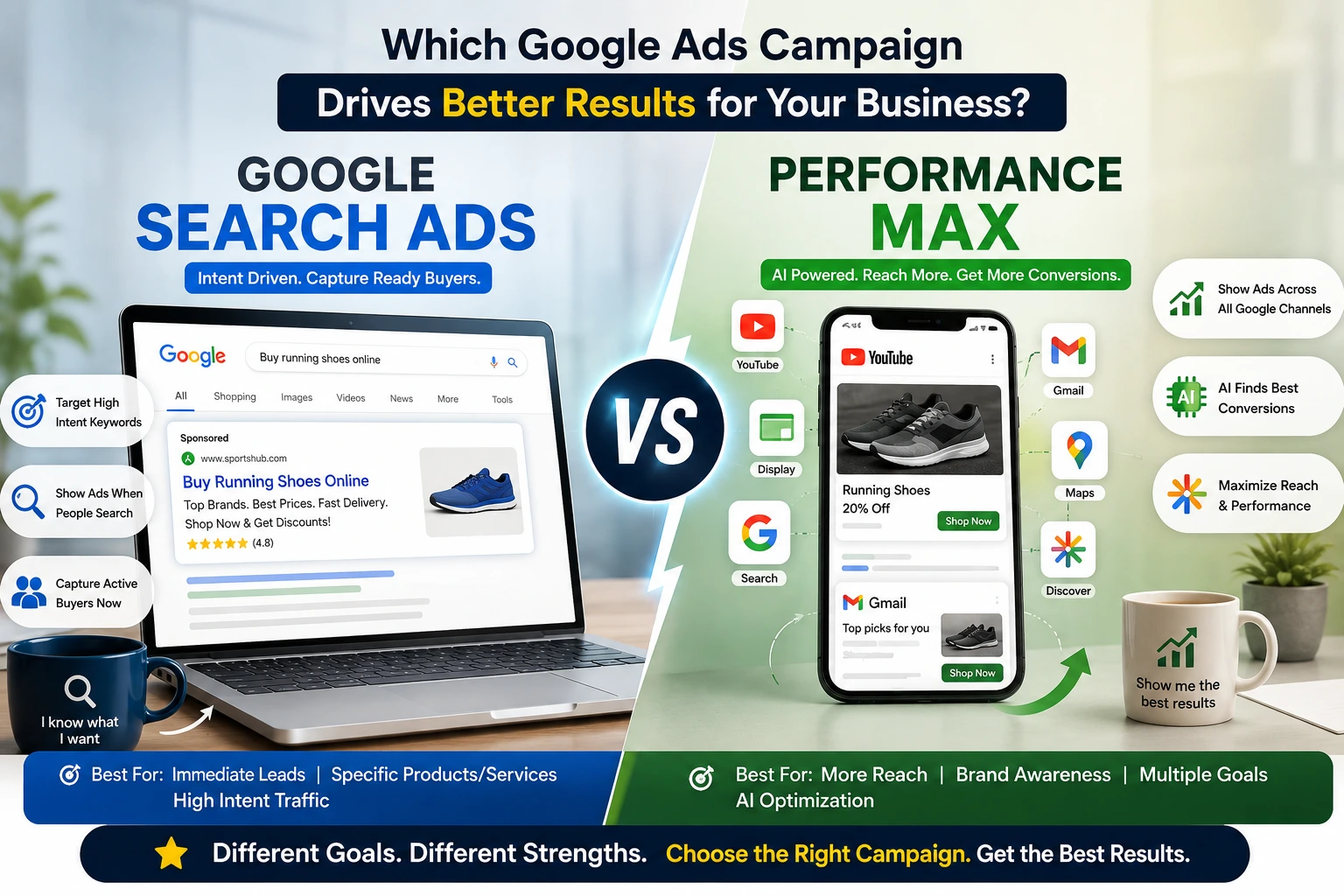
Search Ads are the classic, text-based ads you see when you type something into Google. If someone searches “best dentist near me” or buy running shoes online, your ad can show up right there in the results, matched to what they typed.
How Search Ads Work
With Search Ads, you pick the exact keywords you want to target, write your own ad copy, and control your bids at a very detailed level. You can see exactly which searches are triggering your ads, block irrelevant searches using negative keywords, and adjust everything by hand. This is why many marketers call Search the “gold standard” for direct response and lead generation. Since 2026, Search campaigns also support an optional AI layer called AI Max, which can expand keyword matching and generate ad copy automatically, but the core control still stays with you.
What is Performance Max?
Performance Max, often called PMax, is Google’s newer, fully automated campaign type. Instead of picking keywords, you give Google your goal, your budget, and your creative assets, and the AI decides where to show your ads.
How Performance Max Works
PMax runs your ads across every channel Google owns at the same time, including Search, YouTube, Display, Gmail, Discover, Maps, and Waze, all from one single campaign. The algorithm decides where your budget goes, based on what is most likely to bring a conversion.
The “Black Box” Problem
Here is the part many business owners don’t realize. In earlier versions, Performance Max did not clearly show you how much of your budget went to each channel. Your campaign might spend most of its budget on Display or YouTube, while you assumed it was mainly competing on Search. This lack of visibility became known as the “black box” problem, and it is still the most common complaint marketers have about PMax, even though the reporting has improved significantly.
How Performance Max Reporting Has Improved in 2026
This is a part of the Google Search Ads vs Performance Max conversation that a lot of older articles miss. PMax used to give advertisers almost no visibility. That has changed a lot by 2026.
Today, Performance Max gives you:
- Asset-level performance ratings, marked as Low, Good, or Best, showing which images, headlines, and videos are actually pulling their weight.
- Channel breakdowns per asset group, showing how much of your conversions are coming from Search, Shopping, YouTube, Display, and Gmail.
- Search Terms reports, so you can finally see which real searches triggered your PMax ads, similar to what Search campaigns have always offered.
- Search themes, which let you guide the algorithm toward certain topics without losing the automation benefits.
- Brand exclusions at the campaign level, so you can stop PMax from eating into your own branded search traffic.
If your PMax campaign shows that 90 to 95% of conversions are coming from Search alone, that is a sign your campaign is basically acting like an expensive Search campaign, and you may be missing out on the real value of cross-channel reach because your video and display creative is not strong enough yet.
Google Search Ads vs Performance Max: Key Differences
1. Control
Search Ads give you full control. You choose the keywords, write the exact headlines, and pick the landing page. Performance Max takes most of this control away and hands it to Google’s automation, though search themes now let you guide it somewhat.
2. Reach
Search Ads only show up on Google’s search results and search partner sites. Performance Max reaches people across many more places at once, including video, display banners, and Gmail inboxes.
3. Lead Quality vs Volume
This is one of the biggest differences in the Google Search Ads vs Performance Max comparison. Search targets people who are actively searching, which usually means stronger intent and better lead quality. Performance Max can bring in more volume, but that volume often includes people who were not actively looking to buy, which can lower average lead quality if the campaign is not set up carefully.
4. Budget Transparency
With Search Ads, you can see exactly where every rupee is going, down to the keyword level. With Performance Max, spending is spread automatically across channels, and while the newer channel breakdown reports help, you still don’t get the same keyword-level detail Search offers.
5. Setup Effort
Search Ads take more manual work to set up properly, since you are writing ad copy and picking keywords yourself. Performance Max is faster to launch, since the AI handles most of the heavy lifting once you upload your assets, though building it correctly still takes real thought.
How to Structure Performance Max the Right Way
A lot of the frustration business owners feel with PMax actually comes down to poor setup, not the tool itself. Here is what tends to work well:
- Don’t put everything into one asset group. If you sell shoes and jackets, build a separate asset group for each, with images, headlines, and descriptions specific to that product type. Mixing everything into one group throws away the only real segmentation control PMax gives you.
- Fill every creative slot. Leaving asset slots empty or partially filled tends to hurt your ad’s performance in the auction.
- Use the New Customer Acquisition goal if your list is retargeting-heavy. This lets you bid higher specifically for first-time customers, which is useful for brands that have been stuck mostly reaching repeat buyers.
- Add brand exclusions on launch. This is one of the simplest ways to stop PMax from quietly absorbing branded search traffic that your Search campaign would have converted at a lower cost.
- Give it time before judging. PMax often needs close to 50 conversions in 30 days before bidding stabilizes, and daily results can swing 20 to 30% simply from normal auction volatility, not a real problem.
- Refresh creative every 6 to 8 weeks, replacing your lowest-performing assets rather than rebuilding the whole group from scratch.
Which Industries Benefit More From Each Option?
Ecommerce
Performance Max tends to perform strongly here, especially with a well-structured product feed. Many ecommerce advertisers see meaningfully lower cost per new customer with PMax compared to Search alone, as long as brand exclusions and clean asset groups are in place.
Service Businesses and Lead Generation
Search Ads usually win here. Since these businesses depend on high-intent, ready-to-buy searches, the control and predictability of Search campaigns tend to produce better quality leads. Lead-gen accounts often see a wide swing in lead quality across different PMax asset groups, which makes careful structure even more important if PMax is used at all.
Local Businesses
A mix usually works best, Search Ads for people actively searching nearby, and a smaller PMax budget to pick up additional visibility across Maps, Display, and YouTube.
B2B and High-Ticket Sales
Search Ads generally remain the safer choice, since the sales cycle is longer and lead quality matters far more than raw volume.
When Should You Use Search Ads?
Search Ads usually make more sense when:
- You run a service business or work in lead generation, where intent matters more than volume.
- You want full control over your keywords, ad copy, and budget.
- You need predictable, high-quality leads, especially for high-value services.
- You want to protect your brand name in search results.
- You are just starting out and want something easier to understand and fix if something breaks.
When Should You Use Performance Max?
Performance Max tends to work better when:
- You run an ecommerce business and want to reach people across many channels at once.
- Your goal is broader reach and discovery, not just direct response.
- You already have strong product feed data and real conversion history for the algorithm to learn from.
- You want to save time by letting automation handle bidding and placement.
- You are willing to invest time in proper asset group structure rather than treating it as fully set and forget.
Can You Use Both Together?
Yes, and most of the strongest performing Google Ads accounts in 2026 do exactly this. Google itself refers to this as the “Power Pack” strategy: Performance Max for broad reach and discovery, and Search campaigns for capturing high-intent keyword searches.
There is one risk you need to manage carefully here, called cannibalization. Since Performance Max can also serve ads on search queries, it can end up competing directly against your own Search campaigns, or taking credit for conversions your Search campaign would have gotten anyway. To avoid this:
- Keep your brand name searches running only through Search campaigns.
- Add account-level negative keywords to stop Performance Max from showing on your brand terms.
- Check your search term overlap between both campaign types regularly, using the Search Terms report now available inside PMax.
Google Search Ads vs Performance Max: Pros and Cons
Search Ads
Pros:
- Full control over keywords, copy, and bids
- Easier to understand and manage for beginners
- Strong, predictable lead quality
- Clear visibility into what is working
Cons:
- Limited to search inventory only
- Needs more manual setup and ongoing management
- Cannot reach people who are not actively searching
Performance Max
Pros:
- Reaches people across many Google channels at once
- Faster to launch and easier to scale
- Works well for ecommerce with strong product data
- Reporting has improved significantly, with channel and asset-level breakdowns
- AI can uncover patterns a human might miss
Cons:
- Still less transparent than Search, even with better reporting
- Lead quality can be inconsistent without careful asset group structure
- Less control over exactly where and how your ad appears
- Can quietly compete against your own Search campaigns if not managed
Common Mistakes to Avoid
- Turning off Search Ads completely and moving 100% to PMax. This usually hurts lead quality, especially for service-based businesses.
- Letting Performance Max compete on your own brand name. This wastes budget you were going to get for free through Search.
- Putting every product or service into a single asset group. This throws away PMax’s only real segmentation lever.
- Not feeding Performance Max clean conversion data. The algorithm is only as good as the data it learns from.
- Reacting to daily ROAS swings. PMax naturally fluctuates 20 to 30% day-to-day, so judging it on a single bad day often leads to bad decisions.
- Changing bids or budgets too often. Adjusting target ROAS more than once every couple of weeks can keep resetting the algorithm’s learning.
- Ignoring the overlap between both campaigns. Without checking this regularly, you may end up bidding against yourself.
Conclusion
The real answer in the Google Search Ads vs Performance Max debate is not about picking a winner. Search Ads give you control, precision, and strong lead quality, which makes them essential for service businesses and lead generation. Performance Max gives you reach, scale, and automation, and its reporting has come a long way in 2026, making it much easier to understand where your budget is actually going. As long as you understand its remaining black box nature and structure your asset groups carefully, PMax can work well, especially for ecommerce. In 2026, the businesses getting the best results are the ones using both together, with brand terms protected in Search and careful monitoring to avoid one campaign quietly eating into the other’s results.
Need Help Choosing Between Search Ads and Performance Max?
Deciding how to split your budget between Search and Performance Max, structuring your asset groups properly, and setting both up so they don’t compete against each other takes real experience. If you want this handled properly, connect with DiziSpark. Our team can review your goals, set up the right mix of campaigns, and make sure your budget is going toward real, qualified leads instead of getting lost in a black box.
Frequently Asked Questions
Does Performance Max replace Search Ads?
No. Performance Max can show ads on search, but it does not give you the same keyword-level control, negative keyword management, or intent precision that Search campaigns offer. Most experts recommend running both together.
Which is better for lead generation, Search Ads or Performance Max?
Search Ads usually deliver higher quality leads for service businesses, since they target people who are actively searching with clear intent. Performance Max can add volume, but quality depends heavily on asset group setup and data.
Why is Performance Max called a “black box”?
Because for a long time, Google did not clearly show advertisers how budget was split across channels like Search, Display, YouTube, and Gmail. Reporting has improved a lot by 2026, with asset-level ratings and channel breakdowns, but it is still less transparent than Search.
Should a small business use Performance Max or Search Ads first?
Search Ads are usually easier and safer for beginners, since they are simpler to understand, easier to control, and easier to fix if something is not working. Performance Max can be added later once you have data and experience.