
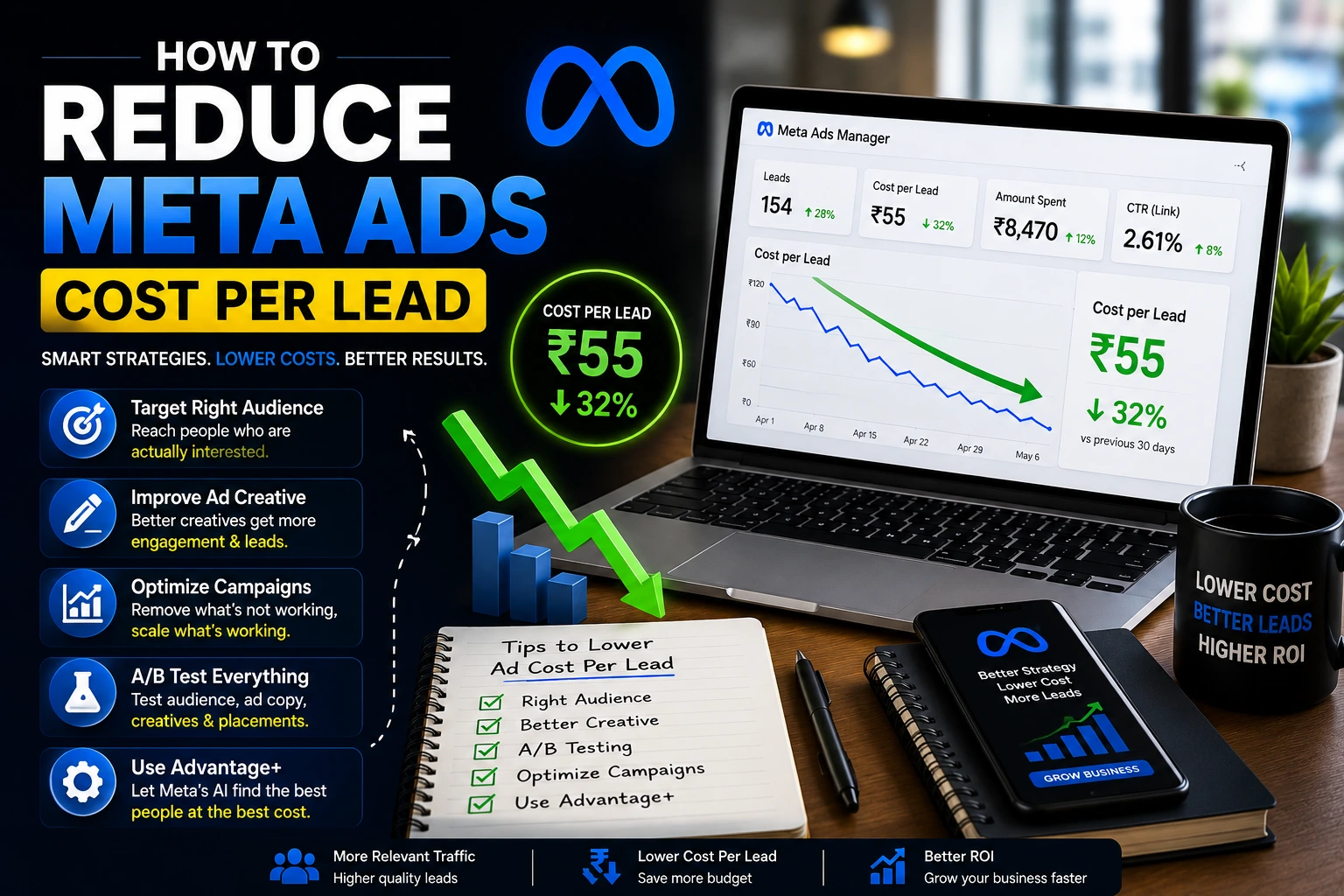
Every business running Meta Ads asks the same question at some point: why does each lead keep getting more expensive? You have not changed much, but your cost per lead keeps climbing month after month. This is not just in your head. Meta ad costs really have been rising across almost every industry, with cost per lead climbing more than 20% in a single year in many cases.
The good news is that how to reduce Meta Ads cost per lead is not a mystery. There are clear, proven steps that work, without needing to cut your budget or take shortcuts that hurt lead quality. In this complete guide, we will go through why costs are rising, how the Meta algorithm actually decides your cost, what a good cost per lead looks like, and detailed, practical strategies you can start using today.
Table of Contents
ToggleUnderstanding Cost Per Lead: The Formula Behind It
Before fixing anything, it helps to understand what cost per lead actually is. It is a simple formula:
Cost Per Lead = Total Ad Spend ÷ Number of Leads
If you spend ₹5,000 and get 20 leads, your cost per lead is ₹250. This number moves based on three things working together: how much you spend, how many people click your ad, and what percentage of those clicks turn into a lead. Improving any one of these three things lowers your overall cost per lead. This is why the strategies in this guide touch targeting, creative, and your landing page, not just one single setting inside Ads Manager.
Why Meta Ads Cost Per Lead Keeps Going Up
A few things are happening at the same time across the industry. More businesses are shifting their budget to Meta, which means more competition for the same audience. Apple’s privacy changes have also made it harder for Meta to track conversions accurately, so the algorithm ends up bidding more aggressively because it has less certain data to work with. On top of that, many advertisers keep running the same old creatives for too long, which naturally pushes costs up as people get tired of seeing them.
None of this means your ads are broken. It means the environment has changed, and your strategy needs to change with it.
What is a Good Cost Per Lead on Meta Ads in 2026?
Before trying to lower your cost per lead, it helps to know what is normal for your industry. Average costs vary a lot depending on what you are selling.
Here are some average 2026 benchmarks by industry:
These are India-specific numbers, not global averages. Ad costs in India are much lower than in the US or UK, so applying Western benchmarks directly to an Indian campaign will give you a completely wrong picture.
- Ecommerce (D2C): around ₹30 to ₹150 per lead
- Real Estate: around ₹150 to ₹600 per lead on Meta, going up to ₹900 in competitive Tier-1 cities
- Home Services / Interior Design: around ₹100 to ₹350 per lead
- Healthcare / Clinics: around ₹150 to ₹450 per lead
- B2B / SaaS: around ₹400 to ₹1,200 per lead
If your cost per lead is far above these numbers for your industry, that is a sign something in your setup needs attention. If you are already close to or below these numbers, your focus should shift toward lead quality rather than just squeezing the price down further.
The Meta Ads Learning Phase: Why It Affects Your Cost Per Lead So Much
This is one of the most misunderstood parts of Meta Ads, and it directly affects your cost per lead more than most people realize.
When you launch a new campaign, or make a big change to one, Meta enters what is called a learning phase. During this time, the algorithm is still figuring out who converts best, and your cost per lead is usually 20 to 50% higher than it will be once the campaign stabilizes.
To exit the learning phase properly, a campaign generally needs around 50 optimization events, such as leads or purchases, within a single week. Here is the simple math problem many businesses run into: if your average cost per lead is ₹300 and your weekly budget is only ₹9,000, you can only generate around 30 leads a week. That is nowhere near the 50 needed, which means the campaign can stay stuck in learning indefinitely, with a permanently higher cost per lead.
What this means for you:
- If your budget is too small to hit 50 events a week, consider optimizing for an earlier action in the funnel, like a form start or a landing page view, to help the algorithm gather signal faster.
- Avoid making frequent changes to budget, audience, or creative, since every major change can reset the learning phase.
- Give a new or edited campaign a “no-touch window” of at least 7 days before making judgments or further changes.
Should You Use Advantage+ Campaigns to Lower Cost Per Lead?
By 2026, Meta has moved most advertisers toward Advantage+, its AI-driven automation system that handles targeting, placements, and budget allocation automatically. In testing, Advantage+ campaigns have shown noticeably better results compared to older, fully manual campaigns, often lowering cost per result while improving overall return on ad spend.
This does not mean you should turn on Advantage+ and walk away. Automated does not mean unmanaged. The businesses getting the best results are the ones who still feed the system good creative, check performance regularly, and understand what the algorithm is doing, rather than treating it as a “set and forget” button. A reasonable starting approach is to run Advantage+ as your main scaling campaign while keeping a smaller manual campaign running alongside it, so you always have a comparison point for performance.
How to Reduce Meta Ads Cost Per Lead: Proven Strategies
Here are the strategies that actually work in 2026.
1. Fix Your Targeting First
Before touching your creative or budget, check your targeting. Showing your ad to the wrong people is one of the fastest ways to waste money. In many cases, letting Meta’s algorithm use a slightly broader audience, guided by strong creative, now performs better than very narrow manual targeting, since the AI can find patterns a human simply cannot see manually.
2. Use Lookalike Audiences
If you have a list of past customers or leads, Meta can find new people who share similar patterns and behavior. This usually brings in better quality leads compared to starting completely from scratch with cold, unrelated audiences.
3. Test Multiple Creatives
Running only one ad for weeks is a common mistake. Test three to five different images, videos, and headlines at the same time within a single ad set, then keep the ones that perform best. Running too many variations at once, however, can dilute your budget and confuse the algorithm’s optimization signals, so keep your active creative count focused rather than scattered.
4. Use Video and UGC-Style Content
In 2026, simple, authentic, user-generated style content is performing very well compared to polished, ad-like content. A short video that feels real, filmed on a phone, often gets more attention and costs less than an overly produced ad. The first three seconds matter most, since that is where most people decide whether to keep watching or scroll away.
5. Improve Your Landing Page
Even a great ad will cost more per lead if your landing page is slow, confusing, or does not match what the ad promised. A fast, clear, mobile-friendly page with one simple offer usually converts far better than a general homepage. Landing page improvements alone can lift conversion rates by 20 to 40%, which directly lowers your cost per lead without spending an extra rupee or dollar on ads.
6. Simplify Your Lead Form
Long forms with too many fields scare people away before they finish. Ask only for the basics, like name and phone number, to start. Interactive, simple forms tend to convert at a much higher rate than long, static ones, and every extra field you remove is one less reason for someone to give up halfway through.
7. Set Up Proper Conversion Tracking
If your tracking is not accurate, Meta cannot optimize properly, and your costs will slowly rise as the algorithm makes decisions with incomplete data. Setting up both the Meta Pixel and Conversions API together gives Meta a clearer picture of who is actually converting, and it is also the technical foundation that makes automated systems like Advantage+ work well in the first place.
8. Optimize for Leads That Actually Convert, Not Just Form Fills
If you are only optimizing for form submissions, you may end up with a lot of cheap, low-quality leads that never turn into real customers. Feeding your CRM data back into Meta through the Conversions API lets the algorithm optimize for leads that actually convert into paying customers, not just people who filled out a form out of curiosity.
9. Exclude Low-Quality Leads and Audiences
If certain groups keep clicking but never turning into real, qualified leads, like people just browsing or looking for free information, exclude them from your targeting. This stops you from paying for clicks that were never going to convert anyway.
10. Retarget Warm Audiences
People who already visited your website, watched your video, or engaged with your page are usually far cheaper to convert than completely new, cold audiences. Build a simple retargeting campaign around these warm groups, and consider allocating close to 40 to 50% of your total budget toward these bottom-of-funnel audiences if lead generation is your main goal.
11. Structure Your Budget Across the Full Funnel
Instead of putting all your budget into one type of campaign, split it across three stages: top-of-funnel content that introduces your brand to new people, middle-of-funnel content for people actively comparing options, and bottom-of-funnel retargeting for people who are close to converting. This structure keeps your funnel full while still capturing the cheapest, most ready-to-convert leads at the bottom.
12. Combine Meta with Search Ads
Running Meta Ads alongside search ads can reinforce your brand across multiple touchpoints. This combination has been shown to lower overall cost per lead, since people who see your brand in more than one place tend to trust and convert faster.
13. Follow Up With Leads Fast
This might not sound like a Meta Ads strategy, but it directly affects your numbers. Reaching out to a new lead within the first five minutes significantly improves your chances of turning that lead into an actual sale, which makes your entire cost per lead feel worth it, even if the raw number stays the same.
A Simple Weekly Checklist to Keep Cost Per Lead Under Control
Use this short checklist once a week to stay on top of rising costs before they get out of hand:
- Check your cost per lead against your industry benchmark.
- Look at ad frequency. If it is above 2.5 to 3, plan a creative refresh soon.
- Confirm your Pixel and Conversions API events are still firing correctly.
- Review which creatives are carrying most of the budget, and pause ones that are clearly underperforming.
- Check if any campaign is still stuck in the learning phase, and calculate whether your budget can realistically support 50 weekly conversions.
- Review your landing page speed, especially on mobile.
Common Mistakes That Keep Cost Per Lead High
- Cutting budget instead of fixing the real problem. Lowering spend on a broken campaign often makes cost per lead worse, not better, since it can push you further from exiting the learning phase.
- Never refreshing creative. Old, repeated ads lead to fatigue and rising costs over time.
- Sending traffic to a slow or generic landing page. This wastes clicks you already paid for.
- Ignoring conversion tracking. Without accurate data, Meta cannot optimize your campaign properly.
- Judging results too early. Constant changes keep resetting the learning phase and pushing costs up.
- Running Campaign Budget Optimization without checking where it sends the money. It can over-allocate budget to a small, cheap retargeting audience while starving the campaigns that actually bring in new leads.
Need Help Lowering Your Meta Ads Cost Per Lead?
Fixing cost per lead properly means looking at your targeting, creative, landing page, tracking, and funnel structure together, not just one piece at a time. If you want this handled the right way, connect with DiziSpark. Our team can audit your current campaigns, find exactly where your budget is being wasted, and build a system that brings in real leads at a lower, more predictable cost.
Conclusion
If you are trying to figure out how to reduce Meta Ads cost per lead, the answer is rarely one single fix. It comes down to a combination of better targeting, fresh creative, a fast landing page, accurate tracking, smart use of automation like Advantage+, and giving your campaigns enough time and budget to properly exit the learning phase. Rising costs across the industry are real, but businesses that focus on these fundamentals consistently see lower, more stable cost per lead, even in a more competitive market. Start with tracking and landing page basics, then build up from there, and you will start seeing real improvement within a few weeks.
Frequently Asked Questions
What is a good cost per lead for Meta Ads?
It depends on your industry. Ecommerce (D2C) often sees lower costs, sometimes as low as ₹30 to ₹150, while real estate and B2B leads in India usually range from ₹150 to ₹1,200 or more per lead.
Does refreshing my ad creative really lower cost per lead?
Yes. Repeated exposure to the same ad leads to fatigue, which raises costs over time. Refreshing creative every few weeks helps keep costs under control.
Should I lower my budget if my cost per lead is too high?
Not immediately. Cutting budget on a campaign with an underlying problem, like weak targeting or a slow landing page, usually makes results worse, not better. It can also prevent the campaign from ever collecting enough data to exit the learning phase. Fix the root cause first.
Is Advantage+ better than manual campaigns for lowering cost per lead?
In most cases, yes, since the algorithm can process far more data than a person managing campaigns manually. But it still needs good creative and accurate tracking behind it to work well, so it is not a shortcut that replaces the fundamentals.