

Meta Ads for local businesses have become one of the most reliable ways for restaurants, clinics, salons, gyms, and home service companies to reach new customers without wasting money on people who will never walk through the door. Instead of paying for a billboard everyone ignores, a local business can put its offer directly in front of the exact people most likely to visit, call, or book, and see the results within days rather than months. This guide walks through the setup, targeting, budgeting, and measurement decisions that separate campaigns that quietly burn cash from campaigns that consistently bring in real customers.
Why Online Leads Matter
A lead is simply someone who has raised their hand, through a form, a call, or a message, to say they are interested in what a business offers, and online lead generation lets a local business collect far more of these signals than word of mouth or walk-in traffic alone ever could.
Because homes, health, food, and fitness decisions rarely happen on the first impression, businesses that only rely on people already searching for them, through Google or a signboard, miss the much larger group of people who are not searching yet but would respond well to the right offer at the right moment. Meta Ads fill exactly that gap by showing a business to people based on where they live, what they are interested in, and how they behave online, long before those people think to type a search query.
Online leads also compound in a way offline leads rarely do. A retargeting audience, a customer list, and a growing set of engaged followers all get more valuable the longer a business advertises, which means the businesses that start building this system early enjoy a widening advantage over competitors who wait. For a local business with a limited marketing budget, this is precisely why treating Meta Ads as an ongoing lead engine, rather than a one-off campaign, produces dramatically better long-term results.
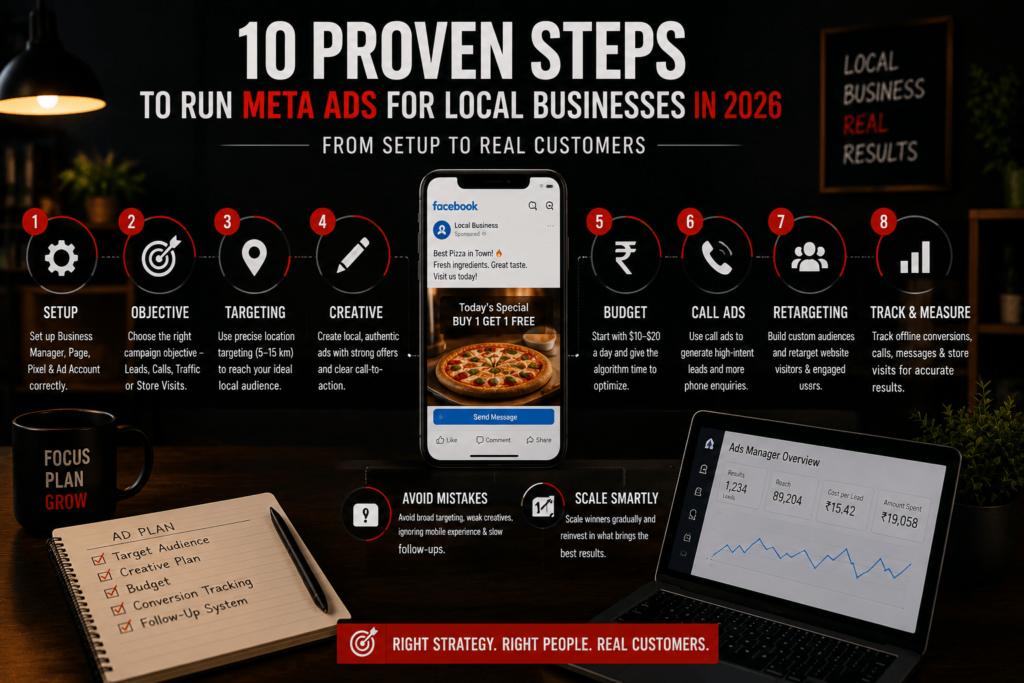
10 Proven Steps to Run Meta Ads for Local Businesses
1. Set Up Your Business Manager and Ad Account Correctly
Before spending any money on Meta Ads for local businesses, the account foundation needs to be solid. Create a Meta Business Suite account and connect a complete Facebook Page along with the linked Instagram profile. Fill out the Page fully with accurate hours, real photos, a clear description, and a working phone number. A thin or incomplete Page undermines trust the moment someone clicks through from an ad.
Inside Business Manager, create the Ad Account and install the Meta Pixel on the website if one exists. This lets Meta start tracking visits and conversions from day one. Skipping this setup step is one of the most common reasons first campaigns underperform. Get the foundation right once, and every campaign built afterward runs more smoothly.
2. Choose the Right Campaign Objective
The objective chosen at the campaign level shapes everything Meta optimizes for, so getting it right matters more than almost any single targeting setting. Store Traffic suits multi-location retailers who want foot traffic and already have locations configured correctly in Business Manager. Leads suits service businesses that need contact details captured through an instant form.
Single-location businesses often do better with Reach or Traffic objectives paired with a strong call-to-action, especially in the first few weeks. The algorithm needs visit volume to learn, and one small store rarely produces enough data for Store Traffic to optimize well. Avoid Sales or App Installs objectives unless the business genuinely sells online or has an app. Picking the wrong objective wastes budget on the wrong optimization signal from the very first day.
3. Master Radius and Location Targeting
Location targeting decides whether the budget reaches real customers or gets wasted on people who will never visit. Most local businesses land somewhere between 5 and 15 kilometers. Restaurants and cafés usually need a tighter radius, closer to 5 to 10 kilometers, since people rarely drive far for casual dining. Home services companies often need 15 to 40 kilometers to cover a realistic service area.
The location type filter matters too. “People living in this location” is the right default for most local businesses, since it excludes tourists and commuters who rarely become repeat customers. Businesses with irregular coverage areas can target specific zip codes or neighborhoods instead of a plain radius, layering inclusions and exclusions to match the real service map.
4. Build Creative That Feels Local, Not Generic
Generic stock photography is one of the fastest ways to waste a local ad budget. Local audiences can tell the difference between a genuine business and a template almost instantly. Creative that performs best shows the actual storefront, the real team, and genuine customers. Before-and-after shots work well for salons and home services, while a short smartphone video tour works well for almost any local business.
Mentioning the specific neighborhood or a recognizable landmark in the ad copy answers the unspoken question, “is this close to me,” before the viewer even has to think about it. Urgency earns its keep here too. Phrases like “open until 9pm tonight” or “same-day appointments available” push a local prospect toward acting now instead of scrolling past.
5. Set a Realistic Testing Budget
Most local businesses should plan on roughly $10 to $20 a day for at least seven to fourteen days during the testing phase. That gives the algorithm enough data to start finding the right people. Below that threshold, delivery tends to become erratic. A very small budget spread across too many days often performs worse than the same money spent in a shorter, more focused burst.
Once a campaign starts producing leads at a cost the business can live with, increase spend gradually, around 20 to 30 percent every few days rather than doubling overnight. Think in terms of customer value, not just ad cost. A $15 phone call that turns into a $500 booking is a far better trade than ten cheap clicks that never convert into anything.
6. Use Call Ads for High-Intent Leads
For service businesses, a phone call is often the highest-intent action a prospect can take. Someone willing to pick up the phone is far more committed than a casual website browser. Call ads let a user tap to call directly from the ad on mobile, without visiting a website first. This removes friction at the exact moment interest is highest.
Phone calls from Meta ads typically cost more than a website click, often $5 to $20 each depending on the market, but they convert to paying customers at a meaningfully higher rate than web clicks. Scheduling call ads to run only during business hours prevents missed calls and protects the customer experience, which matters just as much as the ad spend itself.
7. Build and Layer Retargeting Audiences
Retargeting consistently produces the strongest return of any local Meta Ads tactic, because the audience has already shown interest once before. Useful audiences include recent website visitors, people who engaged with the Page or Instagram profile, video viewers, and an uploaded customer list, which is usually the most valuable of all.
Lookalike audiences built from the best existing customers extend this further, helping Meta find new local prospects who resemble the people already spending the most. Because local audiences are small, frequency caps and creative rotation every two to three weeks keep the same ad from wearing out its welcome.
8. Track Offline Conversions, Not Just Clicks
Local business conversions mostly happen offline, in the store or on the phone, which makes measurement genuinely harder than it is for e-commerce. Meta’s own Store Visits reporting estimates foot traffic using location signals, which is useful as a directional number but rarely an exact count.
Uploading offline conversion data, matched customer transactions by email or phone, connects real purchases back to the ads that drove them and improves the algorithm’s own optimization. Simple methods still matter too. Unique promo codes and training staff to ask “how did you hear about us” remain some of the cheapest, most reliable attribution tools available.
9. Avoid the Most Common Local Ad Mistakes
The most frequent mistake is giving up too early. Many businesses judge a campaign after three or four days, when the algorithm typically needs a week or more just to finish learning. Targeting too broadly is nearly as costly. A plumber advertising to a 50-kilometer radius pays to reach thousands of people who will never become customers.
Ignoring the mobile experience is another quiet budget killer, since the large majority of local ad impressions happen on phones. A slow or unfriendly mobile site loses customers at the exact moment they were ready to act. Slow follow-up undoes everything else on this list. A strong flow of leads means little if response times are inconsistent, since speed of follow-up often decides whether a lead converts or moves on to a competitor.
10. Scale What Works, Gradually
Once a campaign proves itself, the temptation is to scale fast. Resist it. Meta’s algorithm rewards steady, incremental budget increases over sudden jumps. Document what is actually working, the creative angle, the audience, the offer, before duplicating the approach into new locations or new campaigns.
For multi-location businesses, a template campaign adjusted per market, radius, budget, and local offer, tends to scale more reliably than building each location from scratch. Local advertising rewards patience over months, not a single viral moment. The businesses that win treat Meta Ads for local businesses as an ongoing channel, not a one-time campaign.
Quick Reference: 10 Strategies Compared
| Strategy | Best For | Typical Cost | Time to See Results |
|---|---|---|---|
| Account & Pixel Setup | All local businesses | One-time, no ad spend | Immediate foundation |
| Right Campaign Objective | Depends on business type | No extra cost | Immediate |
| Radius & Location Targeting | All local businesses | No extra cost | 1 to 2 weeks to optimize |
| Local, Authentic Creative | All local businesses | Low (phone shoot) | 1 to 2 weeks |
| Testing Budget ($10 to $20/day) | New advertisers | $70 to $280 for 2 weeks | 7 to 14 days |
| Call Ads | Service businesses | $5 to $20 per call | Leads from day one |
| Retargeting Audiences | Established Pages/websites | $10 to $20/day add-on | 2 to 4 weeks |
| Offline Conversion Tracking | All local businesses | Free with POS/CRM | Ongoing |
| Avoiding Common Mistakes | All local businesses | Saves wasted spend | Ongoing |
| Gradual Scaling | Proven campaigns | 20 to 30% increase per cycle | 1 to 3 months |
Conclusion
Meta Ads for local businesses work best when treated as a system rather than a single campaign: a solid account foundation, tight radius targeting, authentic creative, a sensible testing budget, and consistent follow-up all reinforce each other over time. None of these ten steps is complicated on its own, but skipping any one of them, rushing the budget, using stock photos, ignoring offline tracking, tends to quietly undercut the rest. Local businesses that commit to the full system for at least a month, rather than judging results after a few days, are consistently the ones who turn Meta Ads into a dependable source of real, paying customers.
How Dizispark Can Help
Dizispark is a Delhi-based digital marketing agency that manages Meta Ads campaigns for local businesses end to end, handling everything from Business Manager setup and radius targeting to creative production, retargeting, and offline conversion tracking, alongside Google My Business optimization so a business shows up consistently across both paid social and local search. For business owners who would rather focus on customers than ad settings, working with a team that runs these campaigns daily often closes the gap between a promising test and a genuinely dependable lead engine.
Frequently Asked Questions
How much should a local business spend on Meta Ads?
Most local businesses should start with $10 to $20 per day, or roughly $300 to $600 per month, during the testing phase. This is usually enough for Meta’s algorithm to find the right audience within one to two weeks.
What is the best campaign objective for local businesses?
Leads or Calls work best for service businesses that need contact details or a conversation. Store Traffic works best for multi-location retailers, while Reach or Traffic suits single-location businesses just starting out.
How do I set up radius targeting on Facebook?
In Ads Manager, go to the ad set level and open the Locations section. Drop a pin on your business address and choose a radius, typically 5 to 15 kilometres for most local businesses.
Do Meta Ads actually work for small, single-location businesses?
Yes, though single-location businesses usually see better results from Reach or Traffic objectives than Store Traffic, since Store Traffic needs more visit volume than one location typically generates.
What is a good cost per lead for local Meta Ads?
A cost per lead under roughly $20 is generally considered good for local businesses, though this varies by industry and market competitiveness. Cost per phone call typically runs $5 to $20.
Should I use call ads or drive traffic to my website?
Service businesses that rely on quotes or appointments usually see better results from call ads, since phone calls convert at a much higher rate. Retail or product-based businesses often benefit more from website traffic.
How long does it take to see results from Meta Ads?
Meta’s algorithm typically needs seven to fourteen days of consistent spending to finish learning who responds best. Judging a campaign before that point usually leads to premature, inaccurate conclusions.
Can Meta Ads replace Google Ads for a local business?
They serve different purposes rather than replacing one another. Google captures people already searching, while Meta creates demand among people who were not searching yet; most local businesses benefit from using both.